CBM
ASCII-X
BASIC
Disk Commands
Enter RUN mode
Program Format
Secret Variables
Variable Format
Expressions
Keywords
(divide)
(equal)
(less)
(minus)
(more)
(multiply)
(plus)
(power)
Abs
And
Append
Asc
Atn
Auto
Backup
Bank
Begin
Bend
Bload
Boot
Box
Bsave
Bump
Catalog
Char
Chr
Circle
Close
Clr
Cmd
Collect
Collision
Color
Concat
Cont
Copy
Cos
Data
Dclear
Dclose
Dec
Def
Delete
Dim
Directory
Dispose
Dload
Do
Dopen
Draw
Ds
Ds string
Dsave
Dverify
El
Else
End
Envelope
Er
Err
Exit
Exp
Fast
Fetch
Filter
Fn
For
Fre
Get
Get num
Getkey
Go
Gosub
Goto
Graphic
Gshape
Header
Help
Hex
If
Input
Input num
Instr
Int
Joy
Key
Left
Len
Let
List
Load
Locate
Log
Loop
Mid
Monitor
Movspr
New
Next
Not
Off
On
Open
Or
Paint
Peek
Pen
Pi
Play
Pointer
Poke
Pos
Pot
Print num
Pudef
Quit
Rclr
Rdot
Read
Record
Rem
Rename
Renumber
Restore
Resume
Return
Rgr
Right
Rlum
Rnd
Rreg
Rspcolor
Rsppos
Rsprite
Run
Rwindow
Save
Scale
Scnclr
Scratch
Sgn
Sin
Sleep
Slow
Sound
Spc
Sprcolor
Sprdef
Sprite
Sprsav
Sqr
Sshape
St
Stash
Step
Stop
Str
Swap
Sys
Tab
Tan
Tempo
Then
Ti
Ti string
To
Trap
Troff
Tron
Until
Using
Usr
Val
Verify
Vol
Wait
While
Width
Window
Xor
Syntax
Tokens
C128
D64plus
Disk
Escape Codes
Hardware
PCxface
PETSCII
Pet2asc
Futurama
IBM PC-AT
Contact
Games
Glossary
Hall of fame
Hall of shame
Miscellaneous
Privacy policy
Programming
Twisty puzzles
| Keyword | Abbreviation | Token (hex) | Version(s) | Classification |
| SPRDEF | SPR{Shift+D} | FE 1D | 7.0 | Command and Statement |
| Syntax |
| Purpose |
| Remarks |
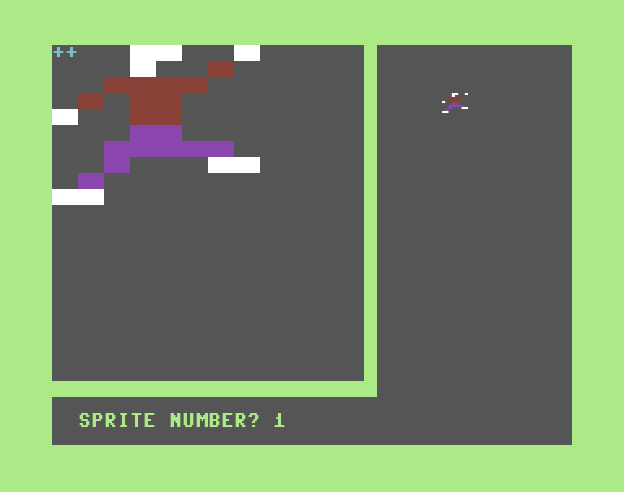
When SPRDEF first begins, it will (try to) allocate a VIC-II bitmap if not already allocated. This may generate OUT OF MEMORY ERROR. Otherwise the high-resolution bitmap will be cleared and displayed with a large edit window on the left.
| Outer Loop |
The image of the selected sprite is saved in a temporary buffer. This allows recovery/undo described later. Next the selected sprite's motion is halted and it is positioned at sprite coordinate (264, 74) [see MOVSPR] which is on the right half of the screen near the top. The choosen sprite is enabled and can be seen with its last-set parameters (see SPRITE). All other sprites are disabled.
The pixels of the sprite's image are drawn at 8x magnifaction in the edit window on the left half of the screen. The sprite-cursor is set to (0,0). The auto-advance feature is activated; this will automatically advance the sprite-cursor one pixel to the right (with wrap to next line) when a pixel-plotting key (a number) is pressed. Now SPRDEF enters its main / inner loop.
| Inner Loop |
| Key(s) | Action |
| 1 | erases the pixel (writes a 0 or %00 to the image data) |
| 2 | draws pixel with color 1 (writes a 1 or %01 to the image data) |
| 3 | draws pixel with color 2 (writes %10 to the image data); multi-color mode only |
| 4 | draws pixel with color 3 (writes %11 to the image data); multi-color mode only |
| Control + [1 ~ 8] | sets the unique color of the sprite (COLOR 1 ~ 8) |
| C= + [1 ~ 8] | sets the unique color of the sprite (COLOR 9 ~ 16) |
| up, down | moves the sprite-cursor in the indicated direction; will not wrap from top to bottom |
| left, right | moves the sprite-cursor in the indicated direction; will wrap to next line unless at the top,left or bottom,right |
| Return, Enter | moves the sprite-cursor to the left-most pixel on the next line |
| A | toggles the auto-advance feature on/off |
| C | copies another sprite's image to this sprite (described below) |
| M | toggles between multi-color and high-resolution sprite mode |
| X | toggles the sprite's X-expansion (double width) |
| Y | toggles the sprite's Y-expansion (double height) |
| STOP | the undo feature; restores the sprite's original image and exits to the outer loop |
| Shift + [Return, Enter] | disables the sprite and exits to the outer loop |
When you press C (for Copy), SPRDEF will prompt "COPY FROM?" and waits for a number 1 ~ 8 or Return/Enter. When one of those keys are pressed, the prompt is erased. If you pressed a number, the selected sprite's image is copied to the sprite currently being edited. Otherwise nothing is copied. Nothing effectively happens if you copy from the same sprite being edited. In any case, the main/inner loop continues.
The eight sprite images are stored sequentialy in Bank 0 RAM between 3584 and 4095 inclusive, 64 bytes each (although only the first 63 bytes of each sprite image is used by the VIC-II(e) chip). The data may be saved with BSAVE or loaded with BLOAD. You may also use SPRSAV to save a sprite's image to/from a string.
Because SPRDEF is an interactive editor, there are no examples of it; however below are examples to save your creation, and load it back later.
BSAVE "SPRITES.BIN", B0, P3584 TOP 4096, U8 : REM device 8, drive 0 SAVING 0:SPRITES.BIN READY. BLOAD "SPRITES.BIN", B0, P3584, U8 : REM device 8, drive 0 (P3584 not needed) SEARCHING FOR 0:SPRITES.BIN LOADING READY. |
The following screenshot shows SPRDEF in multi-color mode.
| Compare With |
| Contrast With |
| See Also |
© H2Obsession, 2014