Home > CBM > BASIC > Keywords > Circle
180 Subpages: (divide), (equal), (less), (minus), (more), (multiply), (plus), (power), Abs, And, Append, Asc, Atn, Auto, Backup, Bank, Begin, Bend, Bload, Boot, Box, Bsave, Bump, Catalog, Char, Chr, Close, Clr, Cmd, Collect, Collision, Color, Concat, Cont, Copy, Cos, Data, Dclear, Dclose, Dec, Def, Delete, Dim, Directory, Dispose, Dload, Do, Dopen, Draw, Ds, Ds string, Dsave, Dverify, El, Else, End, Envelope, Er, Err, Exit, Exp, Fast, Fetch, Filter, Fn, For, Fre, Get, Get num, Getkey, Go, Gosub, Goto, Graphic, Gshape, Header, Help, Hex, If, Input, Input num, Instr, Int, Joy, Key, Left, Len, Let, List, Load, Locate, Log, Loop, Mid, Monitor, Movspr, New, Next, Not, Off, On, Open, Or, Paint, Peek, Pen, Pi, Play, Pointer, Poke, Pos, Pot, Print, Print num, Pudef, Quit, Rclr, Rdot, Read, Record, Rem, Rename, Renumber, Restore, Resume, Return, Rgr, Right, Rlum, Rnd, Rreg, Rspcolor, Rsppos, Rsprite, Run, Rwindow, Save, Scale, Scnclr, Scratch, Sgn, Sin, Sleep, Slow, Sound, Spc, Sprcolor, Sprdef, Sprite, Sprsav, Sqr, Sshape, St, Stash, Step, Stop, Str, Swap, Sys, Tab, Tan, Tempo, Then, Ti, Ti string, To, Trap, Troff, Tron, Until, Using, Usr, Val, Verify, Vol, Wait, While, Width, Window, Xor
Keyword | Abbreviation | Token (hex) | Version(s) | Classification |
| CIRCLE | C{Shift+I} | E2 | 3.5, 7.0 | Command and Statement |
| TRAP | T{Shift+R} | E2 | 4.7 | Statement |
| Syntax |
| Parameters | Type | Legal Value(s) | Default Value | Note(s) |
| colorSource | Integer | 0 or 1 (high-res) 0 to 3 (multi-color) | 1 | The actual color on-screen depends on the colorSource assignment by COLOR |
| xVal | Integer* | -32768 to +32767 | pixel cursor X | rectangular X ordinate or offset for center |
| yVal | Integer* | -32768 to +32767 | pixel cursor Y | rectangular Y ordinate or offset for center |
| distance | Integer* | -32768 to +32767 | 0 | polar distance for center |
| angle | Unsigned Integer | 0 to 65535 | undefined | polar angle for center |
| xRadius | Unsigned Integer | 0 to 65535 | 0 | 1/2 width of circle |
| yRadius | Unsigned Integer | 0 to 65535 | xRadius[*2] | 1/2 height of circle; default times 2 for multi-color mode |
| startArc | Unsigned Integer | 0 to 65535 | 0 | in clockwise degrees; should not be more than endAngle |
| endArc | Unsigned Integer | 0 to 65535 | 360 | in clockwise degrees |
| rotation | Unsigned Integer | 0 to 65535 | 0 | ellipse rotation in clockwise degrees |
| stepAngle | Unsigned Byte | 1 to 255 | 2 | in degrees |
*Due to a bug in the original C128 ROMs (start-up message says Copyright 1985), only positive/unsigned values of 0 to 65535 may be used.
| Purpose |
| Remarks |
The coordinate (after the optional colorSource) defines the center of the "circle"; if not specified, it defaults to the "pixel cursor" (the last point calculated in the previous bitmap command). A specified coordinate will be effected by SCALE if it is active. The resulting values may be off-screen, as long as they are legal as shown above.
The optional xRadius and yRadius define the size of the "circle". The width of a complete (and non-rotated) "circle" is defined by two times xRadius (default 0). The height of a complete (and non-rotated) "circle" is defined by two times yRadius. The default yRadius depends on the GRAPHIC mode. For high-resolution, it is the same as xRadius; for multi-color, it is twice the xRadius.
Because the pixels are not square (in either mode), the result when xRadius = yRadius will not look like a true circle. The following NTSC screen-shot shows the result of CIRCLE 1,160,100,99,99 in high-resolution mode (GRAPHIC 1).
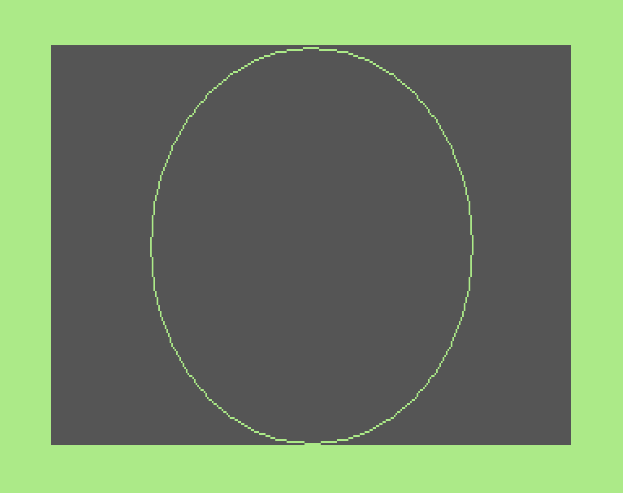
As you can see the result is a tall oval. To get something that actually looks like a circle, you need to adjust the xRadius with division or adjust the yRadius with multiplaction by a factor which depends on NTSC/PAL video standard of the machine and the graphic mode (multi-color or high-res) in use:
| factor | High-Res | Multi-Color |
|---|---|---|
| NTSC | 0.75 | 1.5 |
| PAL | 0.9365 | 1.873 |
The following screen shot shows both methods for an NTSC in high-resolution mode:
- CIRCLE 1,160,100,99,99*.75 (black)
- CIRCLE 1,160,100,99/.75,99 (white)
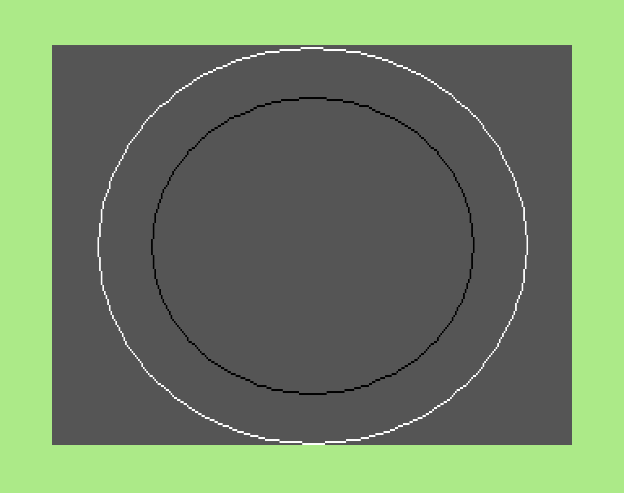
A complete "circle" need not be drawn. A "partial circle" or arc may be drawn instead. To do this, specify a startArc and endArc with a difference less than 360 (the length of the arc in degrees). The endArc should be greater than startArc or you will get strange results! Either (or both) may be more than 360 degrees, in this case the result is the same as if both values were modified by subtracting startArc - Mod(startArc, 360) from both values. If that doesn't make sense, then just keep startArc in the range 0 to 359 and endArc in the range 0 to 719 such that endArc >= startArc (and usually endArc-startArc <= 360). And if that doesn't make sense, you'll just have to play around with it!
The rotation will rotate the "circle" by the specified number of degrees. The angle is only relevent modulo 180 due to symmetry. For example a rotation of 45 is effectively the same as a rotation of 225 or 405 (45 + 180*1 or 45 + 180*2).
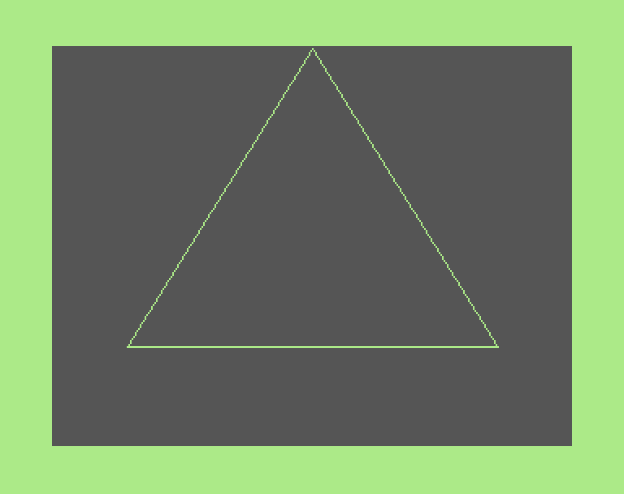
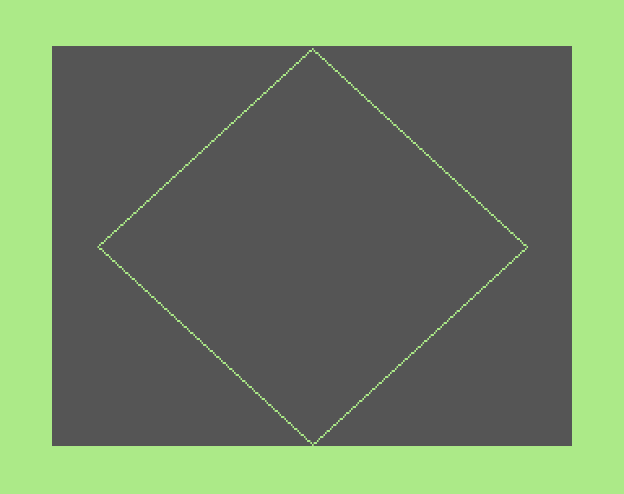
The stepAngle can be used to generate regular polygons instead of an ellipse/circle. You see, by default, this command really draws a 180-sided polygon! The number of sides in the polygon equals 360 divided by the stepAngle (so with the default value of 2, you get 360/2 = 180 sides). Here are values for polygons you may want to try (examples shown further below):
- 120 degrees for a triangle [trigon?] (3 sides)
- 90 degrees for a parallelogram [tetragon?] (4 sides)
- 72 degrees for a pentagon (5 sides)
- 60 degrees for a hexagon (6 sides)
- 51 degrees for a septagon/heptagon (7 sides)
- 45 degrees for an octogon (8 sides)
- 40 degrees for a nonagon (9 sides)
- 36 degrees for a decagon (10 sides)
- 30 degrees for a dodecagon (12 sides)
As you exceed 12 sides, the result looks more and more like a circle (as the stepAngle gets smaller). If you are not drawing a very large (near full-screen) size circle, using a stepAngle of 10 should give acceptable results (a 36-sided polygon) but render noticebly faster than the default value.
The width plotted on screen of each "dot" of all line-segments is controlled by a secret BASIC variable. That secret variable can be set with WIDTH. If it is 1, each dot will be 1 pixel wide; if it is 2, each dot will be 2 pixels wide.
Strangely in all versions, negative angles are not allowed! Try adding 360 (or 720) to fix this problem (this works for positive angles too), but see the notes about startArc and endArc.
Any floating-point numbers will first be converted to integers (see INT). If any value is out-of-range (see above) an ILLEGAL QUANTITY ERROR is generated. If no bitmap has been setup (see GRAPHIC), a NO GRAPHICS AREA is generated.
DRAW 1,60,60: CIRCLE , ,, 50 : REM CIRCLE 1, 60,60, 50,50[*2] |
DRAW 1,60,60: CIRCLE , +10,-10, 40 : REM CIRCLE 1, 70,50, 40,40[*2] READY. DRAW 1,60,60: CIRCLE , 20; 30, 40 : REM CIRCLE 1, 70,43, 40,40[*2] |
CIRCLE 1, 60,60, 100,20 : REM very wide READY. CIRCLE 1, 60,60, 20,100 : REM very tall |
CIRCLE 1, 60,60, 40,, 90,270 :REM radius 40,40[*2] and arc 90~270 degrees |
CIRCLE 1, 60,60, 40,120, ,, 30 :REM radius 40,120 rotate 30 degrees |
| Polygon Examples |


| Compare With |
| See Also |
© H2Obsession, 2014